







When you arrive overseas
Do these things when you land:
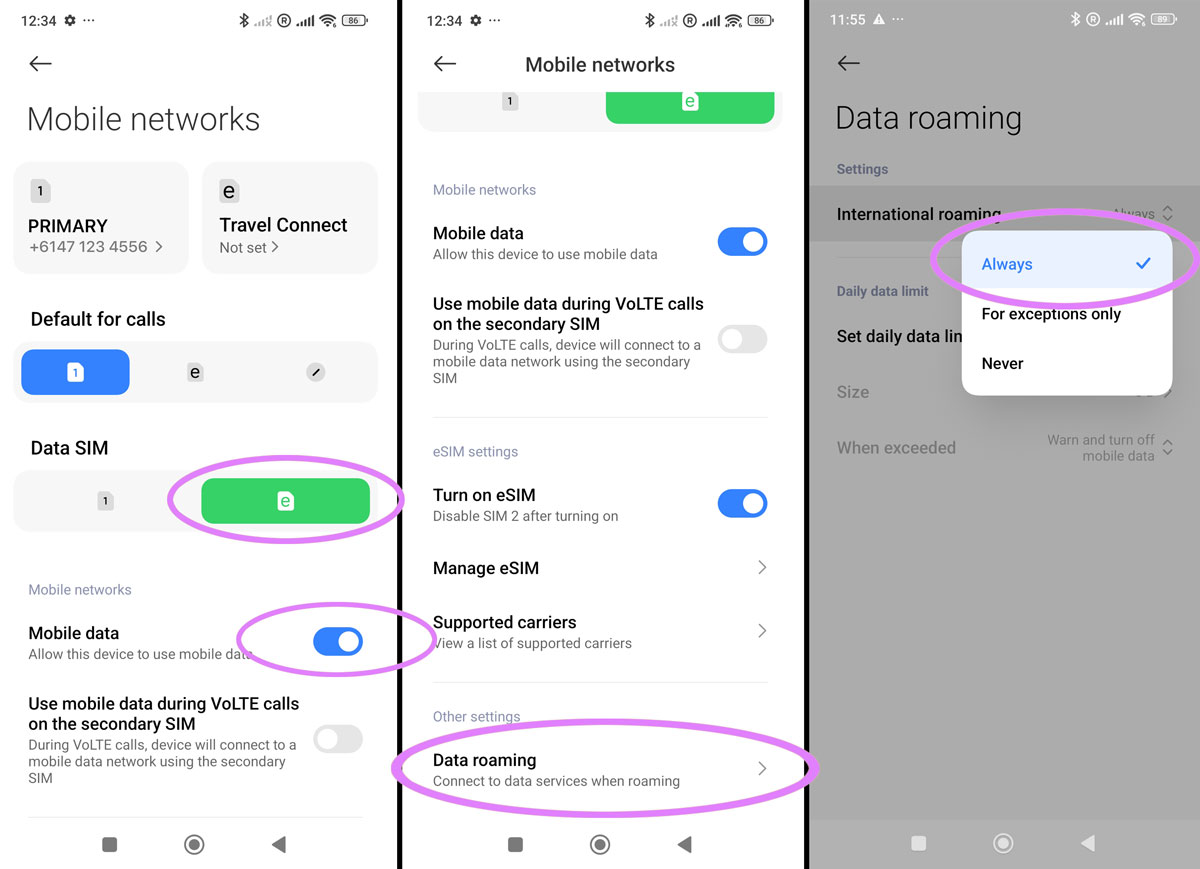
- Open Settings > Mobile Networks
- Ensure your new eSIM is selected for Data SIM
- Ensure Mobile Data is turned on
- Scroll down and select Data Roaming
- Ensure International Roaming is set to Always
- Turn on flight mode, wait 30 seconds, turn it off again
Once you do the above you should be able to connect, note it can take up to 15 minutes to find the network in a new country for the very first time.
Do not scan the QR code again
If you already have the eSIM installed like we confirmed above you do not need to scan the QR code again, this will display an error which will tell you the QR code has been used already since the eSIM is already installed.
The eSIM will activate automatically
You do not need to do anything to "Activate" the eSIM provided it is installed already and you have followed the instructions above for when you land it should be all gravy.
You do not need to click anything or scan anything and you don't even need to use or download our app in order to use the eSIM - but we do recommend our ZenSim app for topping up and checking your balance of course.

Get amongst it
Join the community
We will reach out when we launch new products, about our sustainability projects, specials, new innovations or maybe even cool sh*t we think is inbox worthy.


